
The problem isn't that restaurant owners don't want more reviews. It's that most ask at the wrong time, make the process harder than it needs to be, or don't ask at all. This guide walks you through a practical, step-by-step approach to building a steady stream of reviews — and keeping them working in your favor.
Key Takeaways
- Optimize your Google, Yelp, TripAdvisor, and OpenTable profiles fully before asking for a single review
- The best moment to ask is immediately after a positive experience — emotional recency matters
- QR codes, direct links, and post-visit follow-ups remove friction and increase follow-through
- Responding to every review signals attentiveness to future diners
- Incentivizing reviews violates platform policies and FTC rules — avoid it entirely
How to Increase Online Reviews for Your Restaurant: Step by Step
Step 1: Claim and Optimize Your Profiles on Key Review Platforms
An unclaimed or half-finished profile is a missed opportunity. Diners who find incomplete listings — missing hours, no photos, wrong address — often move on to a competitor. Google explicitly states that complete and accurate profile information makes a listing more likely to appear in relevant local searches, with review count and score factoring directly into local rankings.
Priority platforms for restaurants:
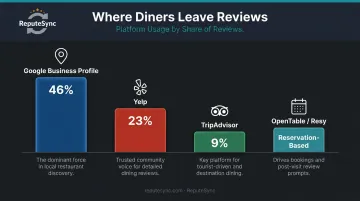
- Google Business Profile — 46% of diners check here first; highest priority
- Yelp — 23% of diners; dining-specific audience with strong local intent
- TripAdvisor — 9% of diners; particularly important for tourist-heavy areas
- OpenTable / Resy — critical for reservation-based restaurants
What "fully optimized" looks like:
- Accurate hours, phone number, and address
- High-quality photos of food, interior, and exterior
- Menu link and business description
- Correct category and cuisine type
- Responses to existing reviews
Step 2: Train Front-of-House Staff to Naturally Prompt Reviews
Your servers and hosts are the highest-leverage touchpoint you have. A brief, genuine mention from the person who just delivered a great meal outperforms any automated message.
The key word is natural. Not a scripted demand — a conversational invitation. Something like: "We're always looking to improve — if you enjoyed your meal, we'd love to hear from you on Google."
Platform-specific rules your staff must know:
| Platform | Can you ask? |
|---|---|
| Yes — neutral requests permitted | |
| TripAdvisor | Yes — neutral reminders permitted |
| Yelp | No — explicitly prohibits asking customers for reviews |
Train staff to read the table first. If a guest complained about slow service or received the wrong order, escalate to a manager — don't prompt for a review.
Step 3: Create Physical and Digital Touchpoints That Remove Friction
Every extra step between a happy diner and a submitted review costs you that review. The goal is to get them to the review form in as few taps as possible.
High-friction: "Go to Google, search our restaurant, scroll to reviews, click Write a Review."
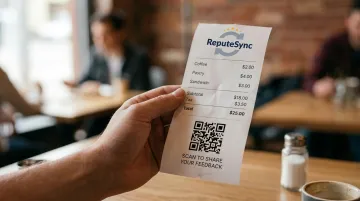
Low-friction: A QR code on the receipt that opens the Google review form directly.
Effective placement options:
- Table tents with a QR code and short call-to-action
- The bottom of printed or digital receipts
- A small card handed with the check
- A framed sign near the exit
Google provides an official tool to generate a direct review link or QR code for your Business Profile — use it. The National Restaurant Association's 2024 data shows 59% of full-service customers are comfortable accessing information via QR code, so the format is familiar enough not to create its own friction.
Step 4: Follow Up With Diners After the Meal via Email or SMS
Some diners fully intend to leave a review and simply forget. A well-timed follow-up catches them before that window closes.
This works best for restaurants that collect contact information through reservations (OpenTable and Resy both send post-dining prompts automatically) or loyalty programs. If you gather emails through an ordering app, you have the same capability.
Best practices for follow-up messages:
- Send within 24 hours of the visit
- Keep the message short — one or two sentences and a direct link
- Warm, personal tone (not a form letter)
- Single CTA: one review platform, one link
Avoid sending follow-ups to guests you know had a problem. A follow-up asking a frustrated diner to "share their experience" rarely ends well.
Step 5: Respond to Every Review — Positive and Negative
Toast's 2026 restaurant-goer survey found that 66% of diners would consider returning after a negative review if the restaurant responded and showed it cares. For future diners reading those reviews, a thoughtful response signals that your restaurant is attentive and accountable — not just reactive.
For positive reviews: Keep it brief and specific. Reference something from their review if possible. Avoid copying and pasting the same response to every five-star rating — it reads as automated.
For negative reviews:
- Acknowledge the specific issue they raised
- Apologize without being defensive
- Invite them to continue the conversation offline (email or phone)
- Never get into an argument in the comments
A response posted three weeks later reads as an afterthought.
What You Need in Place Before You Start Asking for Reviews
Launching a review push without the right foundation wastes effort and can produce embarrassing results.
Platform and Profile Readiness
Every platform should be claimed, verified, and fully filled out before you prompt a single guest. An incomplete Google profile — missing hours or photos — can actually discourage a review from being submitted, because the diner loses confidence that it's a real, active business.
A Dining Experience Worth Reviewing
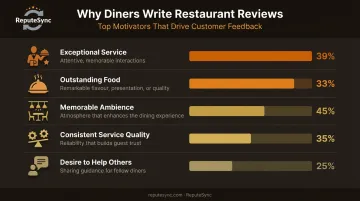
No review strategy compensates for a consistently poor experience. Toast's research identifies exceptional service (39%) and outstanding food (33%) as the top two motivators for guests to leave feedback. A review strategy works best when it amplifies what's already strong — not when it's used to mask what isn't.
That distinction matters operationally. A 2025 analysis of approximately 580,000 Yelp reviews found that service and ambience showed stronger associations with higher ratings than menu breadth or extra amenities — pointing to where investment pays off most.
A Simple, Trackable Request Method
Have at least one low-friction method in place before asking staff to prompt guests verbally. Without somewhere to send diners — a QR code, a link, a follow-up message — verbal prompts produce no results.
Key Factors That Determine How Many Reviews Your Restaurant Gets
Review volume isn't random. These are the variables you can actually control.
Timing of the Ask
The window immediately after a positive experience is the highest-conversion moment. A receipt QR code, a server's verbal mention at checkout, or a same-evening SMS follow-up all capture the diner while the experience is still fresh. Asking days later dramatically reduces response rates — not because diners don't care, but because the emotional connection to that specific meal has faded.
Consistency of Asking
A one-time push produces a one-time spike. Restaurants that make review prompting a daily operational habit — every table, every shift — build steady momentum over time. Occasional asks produce inconsistent results; building it into the shift routine is what separates restaurants with 50 reviews from those with 500.
Friction in the Process
Requiring a login, navigating multiple pages, or copying a long URL are all friction points that kill follow-through. The fewer steps between a happy diner and a submitted review, the better the conversion.
Multi-Platform Presence
Different diners default to different platforms. A restaurant that only monitors Google misses reviews and engagement opportunities on Yelp and TripAdvisor. Managing responses and tracking performance across all three manually is time-consuming — which is why Repute Sync consolidates reviews from Google, Yelp, and TripAdvisor into a single dashboard so owners can monitor, respond, and track trends in one place.
Quality of the Experience Itself
Diners who had a memorable, specific experience — a standout dish, exceptional service, a server who remembered their name — are far more likely to write a review than those who had an adequate but forgettable visit. The review strategy starts in the kitchen and on the floor.
Common Mistakes Restaurant Owners Make When Asking for Reviews
Incentivizing Reviews (and Why It Backfires)
Offering discounts, free items, or anything of value in exchange for a review violates the terms of service of Google, Yelp, and TripAdvisor. It also violates the FTC's 2024 Rule on Consumer Reviews (16 CFR Part 465), which specifically prohibits incentives conditioned on a particular sentiment — and carries civil penalty exposure.
Beyond the legal risk: incentivized reviews often get flagged and removed. You lose both the review and whatever you offered for it.
Asking at the Wrong Moment or the Wrong Way
Prompting a table that just flagged a problem for a review is a reliable way to generate a negative one. Staff need to read the room. If a table had service issues or raised a complaint, the next step is a manager conversation — not a review request.
Signs a review request will backfire include:
- The table flagged a complaint during the meal
- A manager was called to the table
- The guest left visibly dissatisfied
- The server senses tension and hesitation at checkout
Setting Up an In-Restaurant Review Station
A shared tablet or kiosk where guests leave reviews on-premises is a well-intentioned idea that creates real problems. Google's policies prohibit fake engagement and manipulation of ratings — and reviews submitted in bulk from a single device or location raise exactly those flags.
Beyond policy violations, it undermines authenticity. A review written at home, an hour after the meal, reflects a genuine experience. One typed at the restaurant's own device — with a server standing nearby — does not, and readers can often tell the difference.
How to Handle Negative Reviews Without Losing Future Customers
Negative reviews are inevitable. How you respond to them publicly often matters more to future diners than the original complaint.
Respond Calmly, Quickly, and Professionally
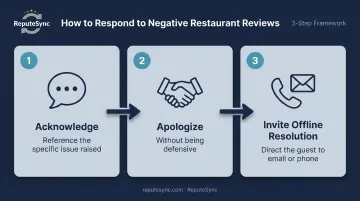
A good negative review response follows a clear structure:
- Acknowledge the specific issue — don't be generic
- Apologize for the experience without being defensive
- Invite the guest to connect offline to resolve it
What to avoid: arguing with the reviewer, dismissing the complaint, or offering defensive explanations. Future diners reading that exchange will draw conclusions about your management style.
That response discipline is only half the equation. The other half is recognizing when individual complaints are pointing to the same underlying problem.
Use Negative Feedback as an Operational Signal
Recurring themes in negative reviews — slow service on weekend evenings, a specific dish that keeps disappointing, parking complaints — are operational data. They surface real problems that, once addressed, reduce future negative reviews and improve the experience for everyone.
A platform like Repute Sync can help identify these patterns across platforms over time, so you can move from reacting to individual complaints to fixing the root cause before it costs you more customers.
Conclusion
Getting more reviews isn't a campaign you run once. It's an operational habit: built on complete platform profiles, well-timed ask methods, low-friction request tools, a front-of-house team that knows when to make the ask, and the discipline to do it consistently.
The two most common failure points are poor timing and too much friction. Both are fixable. The restaurants that do fix them — that consistently collect reviews, respond to all feedback, and use what they learn to improve — build a review presence that strengthens month over month, pulling ahead of competitors who treat their online reputation as an afterthought.
Frequently Asked Questions
Frequently Asked Questions
How do you increase online reviews for a restaurant?
The most effective approach combines optimized review platform profiles, staff trained to ask at the right moment, and low-friction tools like QR codes and post-visit SMS or email follow-ups. Consistency matters more than any single tactic. Make it part of daily operations, not a one-time push.
What review platforms matter most for restaurants?
Google Business Profile is the top priority — 46% of diners check there first. Yelp is second at 23%, followed by TripAdvisor at 9%. For reservation-based restaurants, OpenTable and Resy are also worth maintaining regularly.
Is it okay to offer discounts in exchange for reviews?
No. Incentivizing reviews violates the terms of service of Google, Yelp, and TripAdvisor, and also breaches the FTC's 2024 Rule on Consumer Reviews. Platforms can remove incentivized reviews without warning, costing you both the review and whatever you gave away to get it.
How should a restaurant respond to a negative review?
Respond promptly and acknowledge the specific concern without being defensive. Apologize, then invite the guest to connect offline to resolve it. A calm, professional response signals accountability to every future diner who reads it.
How many reviews does a restaurant need to build credibility?
Most restaurants need 50+ reviews to build meaningful credibility, though quality matters as much as volume. Toast's data shows diners routinely reject restaurants below 3.5 stars, so rating and steady accumulation both matter. A growing review count signals an active, popular restaurant far more convincingly than a static one.
Can you ask customers for reviews after they leave the restaurant?
Yes — post-visit email and SMS follow-ups are effective and compliant on most platforms (Yelp being the exception). The key is sending the request within 24 hours while the experience is still fresh, with a direct link and a single, clear call to action.