The problem is that getting reviews consistently is harder than it looks. Timing matters. Platform rules differ. Staff behavior is inconsistent. And most restaurants have no system — just hope.
This guide covers exactly what to set up before you start asking, which tactics produce the most reviews, what mistakes to avoid, and how to handle the negative ones when they arrive.
Key Takeaways
- Claim and complete your Google, Yelp, and TripAdvisor profiles before asking for a single review
- The highest-converting ask is in-person, from a server, right after a positive meal
- Never offer discounts or perks for reviews; it violates both platform rules and FTC guidelines
- Responding to every review signals to potential diners that you're paying attention
- Centralizing review management across platforms ensures no negative feedback slips through
What to Set Up Before You Start Asking for Reviews
No review tactic works on a broken foundation. If your Google listing has the wrong hours, no photos, or an unverified address, diners who find your profile won't trust it — and reviews you collect won't do the work you need them to.
Claim and Optimize Your Profiles on Key Platforms
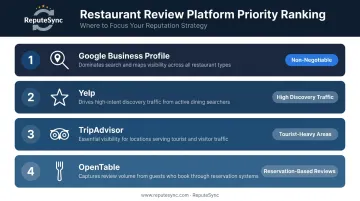
The platforms that matter most for restaurants, in priority order:
- Google Business Profile — Non-negotiable. It affects local search visibility directly and is where most diners land first.
- Yelp — High traffic for restaurant discovery, though its review policies are restrictive (more on that below).
- TripAdvisor — Particularly valuable for restaurants in tourist-heavy areas.
- OpenTable — Worth activating if you accept reservations, as it collects verified diner reviews automatically.
For each profile, fill in everything: accurate hours, a menu link, current photos, phone number, and website. An incomplete listing costs you trust before a single review is ever read.
Once your Google Business Profile is verified, generate a direct review link from your Google Business dashboard. This link — and the QR code Google creates alongside it — can go on receipts, table cards, and follow-up messages. It removes the friction of diners having to search for your listing themselves.
Understand the Platform Rules Before You Ask
Once your profiles are set up, how you ask for reviews depends entirely on which platform you're targeting — because each one has different rules.
- Google actively encourages businesses to remind customers to leave reviews. Sharing your direct review link is explicitly permitted.
- Yelp takes the opposite position. Their policy explicitly states: "Don't ask anyone to review your business." Their recommendation software is designed to identify reviews that appear prompted — and those reviews may not count toward your displayed rating.
- TripAdvisor permits neutral requests for honest reviews but prohibits any benefit connected to a review, including gifts, discounts, or upgrades.
Focus your active solicitation efforts on Google. Let Yelp and TripAdvisor reviews accumulate on their own.
How to Get Customer Reviews for Your Restaurant
No single tactic will build your review volume on its own. The restaurants that consistently outperform competitors use several of these methods in combination — and they execute them repeatedly, not just once.
Ask In Person at the Right Moment
This is the single highest-impact action available to any restaurant. A direct, genuine ask from a server or host — delivered after a positive meal, after the bill, before the guest leaves — outperforms almost every digital alternative.
The phrasing matters more than most owners realize. Instead of a scripted-sounding prompt, train staff to say something natural:
"We're so glad you enjoyed it — if you have a moment, an honest Google review would mean a lot to us."
That's it. No pressure. No QR code shoved in their face. Just a genuine ask tied to a genuine moment.
BrightLocal's 2024 consumer survey found that 28% of consumers said an in-person request was the method most likely to prompt them to leave a review — second only to email at 32%.
Use QR Codes on Receipts and Table Cards
Print your Google review QR code anywhere a diner's eyes go after the meal:
- Printed receipts
- Table tent cards
- To-go bags and packaging
- A small card at the host stand
The goal is to catch guests while the experience is still fresh — and eliminate every possible step between the request and the review form. Two taps maximum.
Send a Follow-Up Text or Email After the Visit
For diners who made a reservation through OpenTable, Resy, or your own booking system, an automated message sent 30–60 minutes after their visit (or the following morning for dinner guests) can increase review volume noticeably.
Keep the message short:
- One sentence acknowledging the visit
- One sentence making the ask
- A direct link to your Google review page
Apply this selectively. Target guests who showed positive signals — a compliment to a server, a clean plate, a loyalty program member. Sending review requests indiscriminately risks catching a frustrated diner and accelerating a negative post.
Train Your Staff to Become Your Review Generation Team
Front-of-house staff are your most powerful review generation asset — and most restaurants never brief them beyond a vague "ask for reviews sometimes."
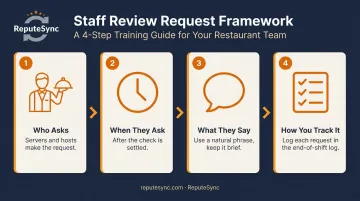
A simple training framework:
- Who asks — The server or host who delivered the primary experience
- When they ask — After the check is settled, before the guest stands to leave
- What they say — A brief, natural phrase (see above); not a script recited from memory
- How you track it — A daily log or section in your end-of-shift checklist
Some restaurants create internal recognition programs where staff who receive review mentions by name earn perks or acknowledgment. This is distinct from incentivizing customers — and stays within policy guidelines for Google, Yelp, and TripAdvisor.
Respond to Every Existing Review
Consistently responding to current reviews — positive and negative — encourages more diners to leave them. The reasoning is straightforward: when guests see that their feedback gets a real reply, they're more likely to bother writing one.
BrightLocal's 2024 data found that 88% of consumers are more likely to use a business that responds to all reviews. That figure drops to 60% when only negative reviews receive responses.
Keep replies brief, specific to the review, and free of promotional language. Mention something from their actual feedback. Sign off with your name or title.
Use Social Media to Keep Review Requests Visible
Sharing positive reviews as social posts reminds your followers that they can — and should — weigh in. A few practical approaches:
- Post a quoted review (with permission or anonymized) with a caption that includes your review link
- Add your direct Google review link to your Instagram bio
- Set your Facebook page CTA button to link directly to your review page
Done consistently, these small placements keep review requests in front of your audience without feeling like a campaign — and each new post reinforces that your restaurant is actively listening.
Key Factors That Affect How Many Reviews You Get
Two restaurants running the same tactics can see very different results. Here's what actually drives the gap.
Timing of the Ask
The window between a guest finishing their meal and walking out the door is your highest-intent moment. Requests made hours later — or the next day — see sharply lower completion rates. The experience fades — and so does the motivation to act.
Ease of the Review Process
Every additional step between a diner and the review form costs you completions. A direct link beats "search for us on Google." A QR code beats a direct link that requires typing. The goal is two taps from request to form — no more.
Consistency of Outreach Across Your Team
Sporadic asking — only when the manager remembers, only on weekends — produces uneven results. Restaurants that build review requests into their service checklist (the same way they build in upselling or check delivery) generate significantly more consistent volume.
Managing Reviews Across Multiple Platforms From One Place
Monitoring Google, Yelp, TripAdvisor, and others separately is operationally difficult. A negative review left unanswered for ten days — the average response time for restaurants, per ReviewTrackers' 2023 data — can influence dozens of potential diners before anyone notices it. That's the gap Repute Sync was designed to close — giving restaurant owners a single dashboard to monitor incoming reviews, respond without switching between platforms, and catch critical feedback before it goes unaddressed for days.
Common Mistakes Restaurants Make When Asking for Reviews
Most of these mistakes are easy to avoid — but a few carry real regulatory or platform consequences if you get them wrong.
- Asking at the wrong moment. A guest who's been waiting 40 minutes for their food doesn't want a QR code shoved at them. Poor timing doesn't just fail to generate a review — it can accelerate a negative one.
- Flooding platforms with reviews from the same network. A sudden spike from the same IP or location can trigger spam filters on Google or Yelp, causing reviews to be removed or your listing to get flagged.
- Offering incentives for reviews. Discounts, free items, or any perk tied to a review violates every major platform's terms of service and the FTC's Consumer Reviews and Testimonials Rule. The FTC's 2024 final rule prohibits compensation linked to review sentiment — knowing violations can result in civil penalties. Yelp may also place a Consumer Alert directly on your business page.
How to Handle Negative Reviews — and Why It Matters More Than You Think
Negative reviews are inevitable. Leaving them unanswered is the most damaging thing you can do.
Prospective diners read owner responses as closely as they read the complaints themselves. ReviewTrackers found that 45% of consumers are more likely to visit a business that responds to negative reviews. Your response isn't just for the unhappy guest — it's a public signal to every future diner reading that thread.
Structure of an Effective Response
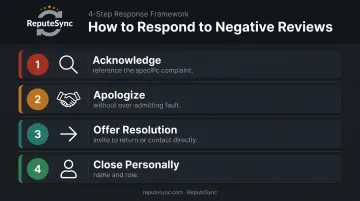
Keep it under 100 words and follow this framework:
- Acknowledge the specific complaint (not a generic "we're sorry you feel that way")
- Apologize without over-admitting fault
- Offer a resolution — an invitation to return, a direct contact for follow-up
- Close personally — your name, your role
Example: "Thank you for sharing this, [Name]. A 45-minute wait for a table that was reserved is not acceptable, and we're sorry your evening started that way. Please reach out to us directly at [email] — we'd like to make it right. — [Owner Name], General Manager"
Why Imperfect Ratings Build More Trust
Consistent, thoughtful responses do more than calm one unhappy guest — they shape how your entire rating is perceived. A restaurant with a 4.2–4.5 star average and active owner responses often outperforms one sitting at a perfect 5.0 with no engagement. A flawless rating with zero responses reads as either fake or indifferent.
Diners trust restaurants that engage honestly with criticism. That combination of real feedback and genuine replies is what tips a hesitant first-timer into making a reservation.
Conclusion
Getting restaurant reviews consistently requires the right setup — optimized profiles, direct review links — paired with well-timed in-person and digital asks. Responding to every review completes the cycle and keeps new feedback coming in.
Most restaurants don't lose potential diners because of bad food. They lose them because their online reputation is neglected — and that's a recoverable problem. That's exactly what Repute Sync was built to solve. It gives restaurant owners one place to monitor, respond, and track review performance across Google, Yelp, TripAdvisor, and more — no dedicated marketing team required.
Start with one action this week. Claim your Google Business Profile. Print a QR code for your receipts. Brief your staff on how to ask. Build from there.
Frequently Asked Questions
What is the best way to get customer reviews?
The highest-converting method is a direct, personal ask from a server or host immediately after a positive dining experience. Pair that with a QR code pointing straight to your Google review page to make the action as easy as possible.
Where can I get customer reviews?
The top platforms for restaurant reviews are Google Business Profile, Yelp, TripAdvisor, and OpenTable. Prioritize Google — it has the most direct impact on local search visibility and is the platform most diners encounter first.
How do I ask a customer for a review at a restaurant?
Keep it natural and sincere. After a positive meal, a server might say: "We're really glad you enjoyed it — if you have a moment, an honest Google review would mean the world to us."
Should I respond to negative restaurant reviews?
Yes — every negative review deserves a prompt, professional response. Prospective diners judge restaurants as much by how owners respond to complaints as by the complaints themselves.
How many Google reviews does a restaurant need?
Aim for 50+ reviews with a 4.0 or higher rating — that's a solid competitive baseline in most markets. More important than total count is recency — 27% of consumers in 2024 expected reviews to be no older than two weeks before trusting them.
Can I offer discounts to customers who leave a review?
No. Offering incentives for reviews violates Google's policies, Yelp's terms of service, and the FTC's Consumer Reviews and Testimonials Rule. Discovered programs can result in review removal, account penalties, or a public Consumer Alert on your Yelp page. Focus on timing and ease of the ask instead.