Introduction
Most diners make up their minds before they ever walk through your door. According to a US Foods survey of 1,003 Americans, 75% read restaurant reviews before dining out, and 79% say those reviews directly affect whether they'll visit at all. That's not a marginal influence — it's the primary decision filter.
Most restaurant owners already know reviews matter. The gap is time. Between staff scheduling, service quality, and inventory, logging into five separate review platforms every day simply doesn't happen.
That's where an online review manager fills that gap. This guide covers how to set one up, use it correctly, and build it into your daily operations — so it works as a system that protects your revenue and local search visibility, not just another tab you open once and forget.
Key Takeaways
- 75% of diners read reviews before choosing a restaurant — your online reputation is your first impression
- Claim and verify profiles on every major platform before setting up any management tool
- The core workflow runs in five stages: setup, automated review requests, daily monitoring, responding within 48 hours, and monthly performance analysis
- Templated responses are worse than no response — personalized replies show diners you're actually listening
- Review count and star rating are confirmed Google local ranking factors — both directly affect your Map Pack visibility
When Should Restaurant Owners Use an Online Review Manager?
The short answer: before you need it.
Most owners consider a review management tool only after ratings slip or a wave of negative feedback hits. By then, the damage is already compounding. A review manager is most valuable when implemented proactively — before a competitor outranks you in Google Maps, or before a new location opens without a reputation strategy in place.
The tool becomes genuinely essential when:
- Reviews are arriving across three or more platforms and manual tracking is breaking down
- A new location is opening and needs its reputation built from day one
- Negative review volume is trending upward over consecutive weeks
- A nearby competitor is consistently appearing above you in local search results
A common misuse pattern: restaurants set up a review management platform, then treat it passively. They log in when a complaint surfaces, respond once, and disappear. That approach misses the compounding benefit of consistent engagement. The tool only works as part of a regular operational rhythm — daily monitoring, prompt responses, and monthly performance analysis.
What You Need Before Getting Started
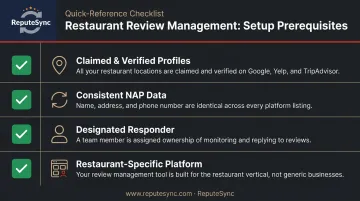
No review management platform can do its job if the foundation underneath it is incomplete. Before connecting anything to a dashboard, make sure these prerequisites are in place:
- Claimed and verified profiles on Google Business Profile, Yelp, TripAdvisor, Facebook, and any booking-linked platforms you use (OpenTable, Resy) — unclaimed profiles can't be responded to, and they signal neglect to diners researching your restaurant
- Consistent NAP data (Name, Address, Phone number) across every platform — inconsistencies create friction in local search and erode trust before a diner even visits
- A designated responder — someone with authority to write or approve review replies; the tool surfaces reviews, but a human needs to own the response workflow
- A restaurant-specific management platform — general-purpose tools weren't built for platforms like OpenTable or TripAdvisor and often miss the workflows restaurants actually need; purpose-built options like Repute Sync are designed specifically for this
Get these four things squared away first — they're the most common source of setup problems, and fixing them after the fact costs more time than doing it upfront.
How to Use an Online Review Manager for Your Restaurant
Effective review management follows a defined sequence. Skipping steps — especially connecting profiles or configuring automated requests — leads to missed reviews, inconsistent responses, and lost recovery opportunities.
Step 1: Setup and Profile Configuration
Connect each review platform to your management dashboard. Google, Yelp, TripAdvisor, Facebook, and any reservation-linked platforms each have their own integration path. Completing this step for every platform matters because reviews on the ones you skip go unmonitored.
The most common setup error: restaurants connect Google and nothing else. Yelp and TripAdvisor carry enormous weight with first-time visitors and tourists — audiences you may be losing without knowing it.
For platform-specific integration details, contact Repute Sync directly at (919) 739-2795 or via hello@reputesync.com to confirm which platforms are currently supported and how each connection is configured during onboarding.
Step 2: Launching Automated Review Requests
Once profiles are connected, configure post-dining review request triggers. Common triggers include:
- SMS within 1-2 hours of the meal, linked to reservation data
- QR codes on receipts or table cards
- Follow-up emails for online or delivery orders
One compliance point that matters here: Yelp explicitly instructs businesses not to solicit reviews. Review requests should point to Google or a neutral landing page — not directly to Yelp. Google permits neutral review requests but prohibits incentivized solicitation or selective targeting of positive reviewers.
The indicator that your system is working: a steady, incremental increase in new reviews week over week. A spike followed by a drop usually means someone did a one-time push rather than setting up an automated system.
Step 3: Monitoring Incoming Reviews Daily
Your dashboard's unified inbox should be reviewed every day. Filter by:
- Star rating — prioritize 1 and 2-star reviews
- Keywords — flag mentions of food safety, specific dishes, or recurring staff complaints
- Platform — ensure no source is going unread
Maintain a maximum 24-48 hour response window for negative reviews. According to Bloom Intelligence's restaurant benchmark data covering roughly 75,000 reviews, only about 38% of Google restaurant reviews receive an owner response. Responding consistently puts you ahead of most competitors before you've even said anything.
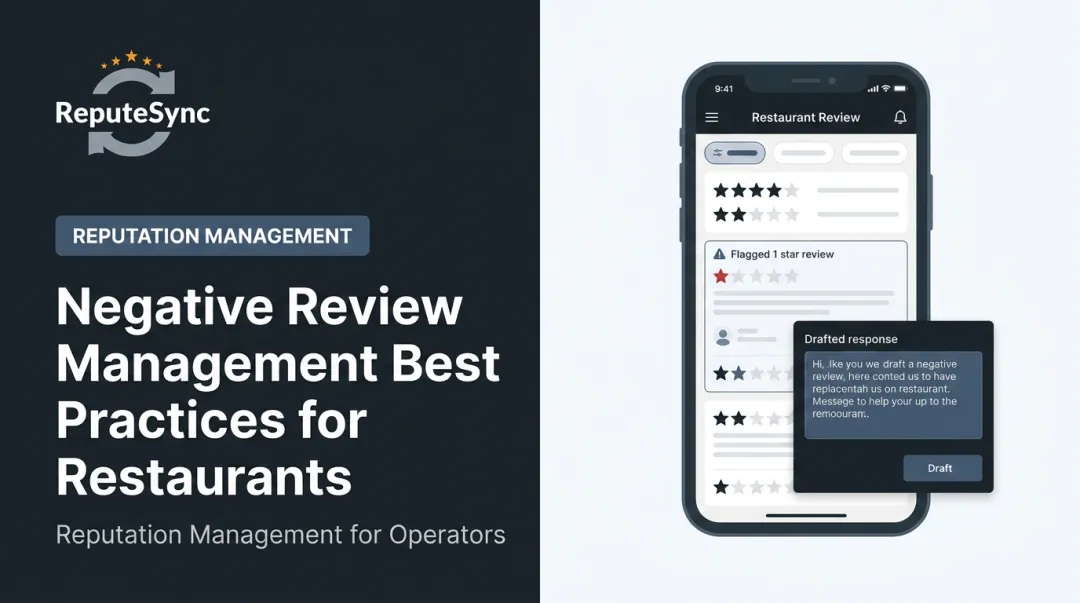
Step 4: Responding to Reviews Correctly
Use a two-track approach:
For positive reviews: Reference something specific — the dish they mentioned, the occasion they were celebrating. Generic "Thanks for visiting!" replies are visible to every potential diner reading your page, and they signal that you're not actually paying attention.
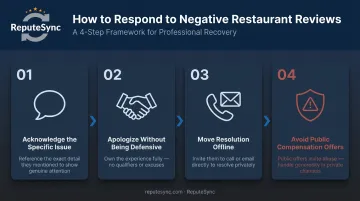
For negative reviews:
- Acknowledge the specific issue
- Apologize without being defensive
- Move the resolution offline ("Please reach out to us directly at...")
- Avoid public compensation offers
The most damaging pattern in restaurant review management is copy-pasting the same response to multiple reviews. Diners reading through your responses can spot it immediately, and it suggests no one is actually engaged with the feedback.
Step 5: Analyzing Review Data Monthly
Set aside time each month to run a structured review audit. Look for:
- Recurring keywords in negative reviews — "slow service," "cold food," "noisy" — that indicate operational patterns, not isolated complaints
- Rating trends by platform over time
- Improvement areas that haven't been addressed since the previous audit
Bring these findings to your kitchen manager or floor supervisor. Unlike surveys, review data reflects real dining experiences that customers chose to document unprompted. A restaurant that closes a recurring complaint within 30 days typically sees rating movement within the following billing cycle — that's the feedback loop worth building.
Best Practices for Managing Restaurant Reviews Effectively
A functional system covers the basics. These practices separate restaurants that maintain solid ratings from those that steadily improve them.
Time review requests strategically. The post-dining window — within 1-2 hours of the meal, or the morning after a dinner service — produces better results than batch sends at the end of the day. Proximity to the experience matters.
Train front-of-house staff to mention it. A brief, natural comment at checkout ("You'll get a quick text in a bit — we'd love your feedback") increases follow-through when the request arrives. The human touchpoint makes the automated message feel less cold.
Use negative reviews as internal performance data. Share review insights with your kitchen manager or floor supervisor weekly. If three reviews in two weeks mention slow ticket times on weekend nights, that's a staffing signal — not just a reputation problem.
Monitor competitor review trends monthly. Check what your top local competitors are being praised or criticized for. Service gaps they're consistently failing on are opportunities you can act on. A quick manual scan of competitor profiles on Google Maps and Yelp once a month takes 20 minutes and can surface patterns worth acting on.
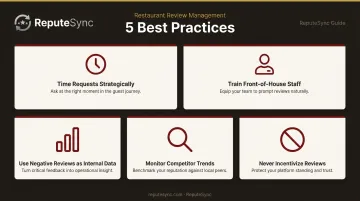
Never incentivize reviews. Offering discounts, free items, or any other incentive in exchange for reviews violates Google and Yelp policies. Yelp places Consumer Alerts directly on the profiles of restaurants flagged for this behavior — visible to every potential diner who finds them. The reputational cost far exceeds any short-term rating gain.
Conclusion
An online review manager is only as effective as the operational habits built around it. The technology handles aggregation, alerts, and automation — but the restaurants that consistently win on review platforms treat three things as ongoing disciplines, not periodic tasks:
- Monitoring all platforms consistently, not just when something goes wrong
- Responding to every review — positive and negative — within 24–48 hours
- Requesting reviews from satisfied guests as a standard part of the dining experience
Proactive review management is also direct customer recovery. A potential diner who reads a one-star review with no response assumes the experience reflects current reality — and books a table somewhere else. That cycle is preventable with a consistent system in place.
If your current approach is reactive, a competitor with a better-managed profile is already pulling ahead. Tools like Repute Sync are built specifically for restaurants to make these disciplines manageable — combining monitoring, response tracking, and automated review collection in one dashboard. The habits are straightforward. The results compound over time.
Frequently Asked Questions
What is an online review manager for restaurants?
It's a software platform that pulls reviews from Google, Yelp, TripAdvisor, and other restaurant-specific platforms into one dashboard. Owners can monitor, respond to, and request reviews without logging into each site separately — saving time and reducing the risk of missing critical feedback.
Which review platforms matter most for restaurant owners?
Google is the most critical for local SEO and Map Pack visibility. Yelp carries a high-intent dining audience. TripAdvisor is especially important in tourist-heavy markets. OpenTable matters for post-reservation reviews tied directly to the dining experience — don't leave any of these unmonitored.
How do I respond to a negative restaurant review without making things worse?
Acknowledge the specific issue, apologize sincerely, and invite the reviewer to contact you directly to resolve it. Don't argue publicly, use copy-paste responses, or offer compensation in the thread — potential diners read your replies, and those mistakes are visible to all of them.
How often should restaurant owners request reviews from customers?
After every dining experience, automated via SMS or email. No individual customer should receive more than one request per visit. The goal is consistency across all diners — not volume from the same people repeatedly.
Can online review management actually improve my restaurant's Google ranking?
Yes. Google officially confirms that review count and star rating factor into local search ranking. Restaurants that consistently generate new reviews and respond to them are more likely to appear in the Google Map Pack, which drives direct foot traffic.
What is the difference between review monitoring and review management?
Monitoring is tracking what reviews are being posted. Management includes responding, requesting new reviews, analyzing sentiment trends, and acting on feedback. Monitoring tells you what's happening. Management determines what you do about it.