Introduction
Most diners don't walk through your door without checking your reviews first. According to Toast's 2026 restaurant-goer survey, 94% of respondents say online reviews influence where they eat — making your review profile one of the most direct drivers of foot traffic and reservations.
Most restaurant owners know reviews matter. The gap is execution. Asking at the wrong moment, through the wrong channel, or in the wrong way produces low response rates, guideline violations, or a flood of negative feedback from customers who weren't ready to be asked.
Getting execution right is what this guide is about. It covers the most effective methods for requesting reviews, how timing affects response rates, the variables that separate high-performing review programs from forgettable ones, and the mistakes worth avoiding before they cost you.
Key Takeaways
- Ask immediately after the meal or within 1–2 hours post-visit — that's when motivation is highest
- In-person asks, QR codes, SMS, and email each serve different moments in the dining journey
- Google welcomes review requests; Yelp explicitly prohibits them — treat each platform differently
- Personalized, low-friction requests consistently outperform generic ones
- Automation removes staff dependency and keeps requests consistent across locations
How to Request Reviews from Restaurant Customers
There's no single method that works for every restaurant. Your setup, staff capacity, and customer base all shape which approach fits. Most restaurants benefit from combining two or three of the following.
In-Person Ask at the Table or Point of Sale
This is the highest-converting method — and it requires no technology. When the check arrives or the meal wraps up, a server or host can make a natural verbal request while the customer is still at peak satisfaction.
The key is making it feel genuine rather than rehearsed. A line like "We'd love to hear what you thought — if you have a moment, a Google review means a lot to us" lands far better than a generic script. Train staff to deliver it naturally, not robotically.
One critical rule: only ask visibly satisfied customers. Reading the room isn't optional — prompting someone who's been visibly frustrated is a direct path to a negative review.
QR Codes on Tables, Menus, and Receipts
QR codes work as a passive, low-effort prompt. Place them on:
- Table tents
- Check presenters
- Printed receipts
- Menu back covers
The QR code must link directly to your review submission page — not your homepage, not a Google search result. Every extra click customers have to take reduces the chance they'll follow through. Linking straight to your Google Business Profile review form is the standard approach.
During busy service, when staff can't pause for verbal asks, QR codes give satisfied customers a frictionless path to leave feedback on their own time.
SMS and Email Follow-Up After the Visit
Post-visit messages work well when you've captured contact information through reservations, loyalty programs, or online orders. The timing window matters more than most operators realize: messages sent within 1–2 hours of the visit reach customers while the experience is still fresh. Waiting until the next day means competing with a full inbox and fading memory.
For SMS, keep it short:
- Lead with the customer's name — it signals the message is personal, not automated
- Reference the visit briefly ("Hope you enjoyed dinner with us tonight")
- Include a direct review link
- One clear call to action — nothing else
Email allows slightly more space, but the same principles apply. A branded, personalized message that references the actual visit will always outperform a generic blast.
Automated Review Request Tools
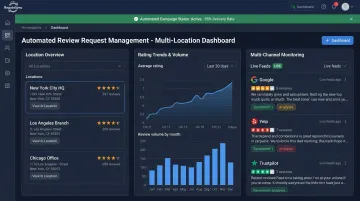
SMS and email work well — until you're managing multiple channels, locations, or a high volume of covers. At that point, manual follow-up breaks down fast. A platform like Repute Sync handles automated review collection across multiple platforms, letting restaurant owners monitor responses and track rating trends from a single dashboard — without relying on individual staff members to remember to ask.
For operators running more than one location, automation is less of a convenience and more of a necessity. Without it, your review volume becomes a direct reflection of shift-to-shift staffing inconsistency — not guest experience.
When to Ask Restaurant Customers for a Review
Timing is the single biggest variable in whether a customer follows through. Ask too early and it feels presumptuous. Ask too late and the moment has passed.
The optimal windows:
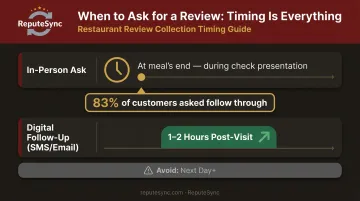
- In-person: Right after the meal wraps up — when you present the check or as guests are getting ready to leave
- Digital (SMS/email): Within 1–2 hours post-visit
BrightLocal's 2026 Local Consumer Review Survey found that 78% of consumers had been asked for a review in the prior year, and 83% of those asked followed through. That's a strong completion rate, though it holds only when the ask reaches people while they're still engaged.
What to avoid:
- Asking mid-meal (it interrupts the experience and feels transactional)
- Following up multiple days later (motivation drops sharply)
- Sending more than one follow-up request — multiple asks feel pushy and can damage the goodwill built during the meal
Key Factors That Affect Your Review Request Success
Beyond channel and timing, several variables determine whether a customer actually writes a review.
Channel Match to Customer Behavior
Direct customers to the platform they already use. Older diners tend to favor Google; younger guests may be more active on Yelp or social review platforms. Sending someone to an unfamiliar platform they rarely visit reduces conversion, no matter how well-written the request.
Google should be the priority for most restaurants. BrightLocal found that **71% of US consumers used Google for local business reviews** — and Google confirms that review count and score factor directly into local search ranking. More reviews and higher ratings improve your visibility in local results.
Friction in the Request Process
Once you've chosen the right platform, the next goal is making it as easy as possible to follow through. Every additional step between the request and the completed review costs you conversions. Reduce friction by:
- Linking directly to the review submission form (not your Google profile homepage)
- Using QR codes that open Google immediately
- Avoiding any requirement to log in to an unfamiliar platform before reviewing
A customer who has to search for your restaurant, navigate multiple screens, or create an account they don't have will almost never complete the review.
Personalization of the Ask
Generic requests underperform. A message that references the customer's name, visit date, or something specific about their experience signals that the ask is genuine. Even basic personalization makes a measurable difference — "Hi Sarah, hope you enjoyed your dinner with us last night" consistently outperforms "Dear valued customer, please leave us a review."
Platform Compliance and Guideline Adherence
This is where many restaurants create problems without realizing it.
| Platform | Solicitation Policy | Incentives |
|---|---|---|
| Permitted | Prohibited (discounts, free items, payment) | |
| Tripadvisor | Permitted (must ask all guests, not selectively) | Prohibited regardless of rating |
| Yelp | Explicitly prohibited | Not applicable — the ask itself is the issue |
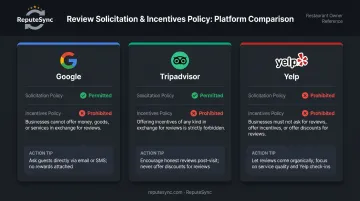
Yelp's policy is unambiguous: "Don't ask anyone to review your business." Yelp's own documentation warns that solicited reviews are likely to be filtered out and may harm your placement in Yelp search results.
For Yelp, use passive prompts instead — "Find us on Yelp" signage, a link in your email footer, or a mention on your website. Let customers discover and post on their own.
Common Mistakes Restaurants Make When Requesting Reviews
Most review request missteps fall into three predictable categories:
Asking everyone indiscriminately. A customer who just waited 40 minutes for a cold entrée doesn't need a review prompt — they need an apology. Train staff to read the room and only invite clearly satisfied guests. Prompting the wrong person is worse than not asking at all.
Incentivizing reviews in exchange for discounts or free items. Google prohibits payment, discounts, or free goods in exchange for reviews. Tripadvisor bans incentives regardless of rating. The FTC's Consumer Reviews and Testimonials Rule, effective October 21, 2024, also prohibits incentives tied to any particular sentiment. Even a well-intentioned "leave any review and get 10% off" can trigger suppressed reviews or account penalties.
Sending generic, unbranded requests. A bulk message with no personalization, no restaurant name, and no reference to the actual visit gets deleted. Every outreach — SMS, email, or printed card — should include your restaurant's name, brand tone, and a specific nod to the visit.
Troubleshooting: When Your Review Requests Aren't Working
Inconsistent results usually trace back to one of three fixable problems. Here's how to identify which one is affecting your restaurant — and what to change.
Low Response Rate on SMS or Email Requests
The most common culprit is friction: messages sent too late, generic subject lines, or review links that require extra clicks before reaching the form.
To improve response rates:
- Send within 1–2 hours of the visit while the experience is still fresh
- Open with the customer's name and a reference to their visit (not a generic prompt)
- Link directly to the review form — not a landing page that requires another click
Only Unhappy Customers Are Leaving Reviews
Dissatisfied customers are self-motivated to leave reviews. Satisfied ones need a nudge — and without a consistent outreach process, they rarely bother.
To fix the imbalance:
- Build post-visit outreach into every customer interaction, not just occasional ones
- Use in-person table prompts to capture positive sentiment before it fades
- Follow up within a few hours so the goodwill from a great meal is still top of mind
Review Volume Is Inconsistent Across Locations or Channels
When review requests depend on individual staff initiative, volume drops whenever things get busy or turnover hits. The ask gets skipped — and there's no system to catch it.
To create consistency:
- Tie review requests to your reservation or POS system so they trigger automatically
- Remove the manual step entirely by automating outreach at the point of qualifying touchpoints
- A platform like Repute Sync reduces staff dependency by ensuring every eligible customer receives a request, regardless of who's working that shift
Conclusion
Getting reviews consistently comes down to asking at the right moment, through the right channel, with enough personalization to feel genuine. Timing, compliance, and delivery all have to work together. No single tactic carries the whole weight.
The most common failure points — asking at the wrong moment, using copy-paste messages, or ignoring Yelp's no-solicitation rule — are all preventable with a structured approach and staff alignment. Build the system once, train your team on it, and let consistency do the rest.
Restaurants that proactively manage their review pipeline don't just collect more stars. They attract new diners, respond faster to problems, and build a measurable edge in local search results. For most restaurants, that's where the next guest is already deciding where to eat. Tools like Repute Sync can help automate and sustain that pipeline once the process is in place.
Frequently Asked Questions
How do I request a review?
Restaurants can request reviews through a verbal ask at the end of the meal, a QR code on the receipt or table tent, or a follow-up SMS or email sent within a couple of hours of the visit. The key is making it easy — link directly to the review form and ask while the experience is still fresh.
What does "request a review" mean?
Requesting a review means proactively reaching out to a customer, either in person or digitally, and inviting them to share their experience on a public platform like Google or Tripadvisor. It's a deliberate ask rather than passively hoping satisfied guests post on their own.
Should restaurants ask for Google reviews or Yelp reviews?
Google is the priority for most restaurants because it directly affects local search visibility and explicitly permits businesses to ask for reviews. Yelp prohibits solicitation entirely, so use passive prompts like "Find us on Yelp" signage rather than a direct ask.
What is the best time to ask restaurant customers for a review?
In person, ask as the meal wraps up — when the check arrives or the guest is leaving. For SMS or email follow-up, send within 1–2 hours of the visit. Waiting longer means competing with a full inbox and a fading memory.
Can I offer a discount or free item in exchange for a review?
No. Google prohibits review incentives, Tripadvisor bans them outright, and the FTC's 2024 rule bars incentives tied to any particular sentiment. Even seemingly neutral offers can result in suppressed reviews or account penalties across platforms.
How many times should I follow up with a customer who hasn't left a review?
Send no more than one follow-up after the initial request. Multiple asks feel pushy and can create a negative impression that overshadows any goodwill built during the dining experience. One request, one follow-up — after that, move on.